Why Technical SEO Matters: The Foundation of Rankings
A solid technical seo audit checklist serves as a routine health screen for your website. Search engine algorithms have evolved, but their fundamental process remains the same: crawl, index, and rank. If your site has crawlability barriers, poor mobile layout, or slow performance, even the best copywriting won’t save your rankings.
In fact, a recent Semrush Technical SEO Study analyzing 100,000 websites found that duplicate content is present on 50% of sites, and crawlability issues like robots.txt formatting errors and sitemap discrepancies remain in the top ten most frequent critical errors.
If you want an instant snapshot of your site’s technical health before doing a manual deep dive, you can run your site through our free seo audit tool. It checks over 60 critical performance, technical, and usability signals in seconds.
Otherwise, grab a coffee, open your browser tabs, and let’s start the clock.
The 30-Minute Technical SEO Audit Checklist
Phase 1: The Diagnostics & Crawlability (Minutes 0–5)
The first step on our technical seo audit checklist is to initiate a website crawl. This simulates how search engine spiders view and traverse your site.
- Action: Open a crawling tool like Screaming Frog, Sitebulb, or Ahrefs Webmaster Tools, enter your homepage URL, and hit “Start.”
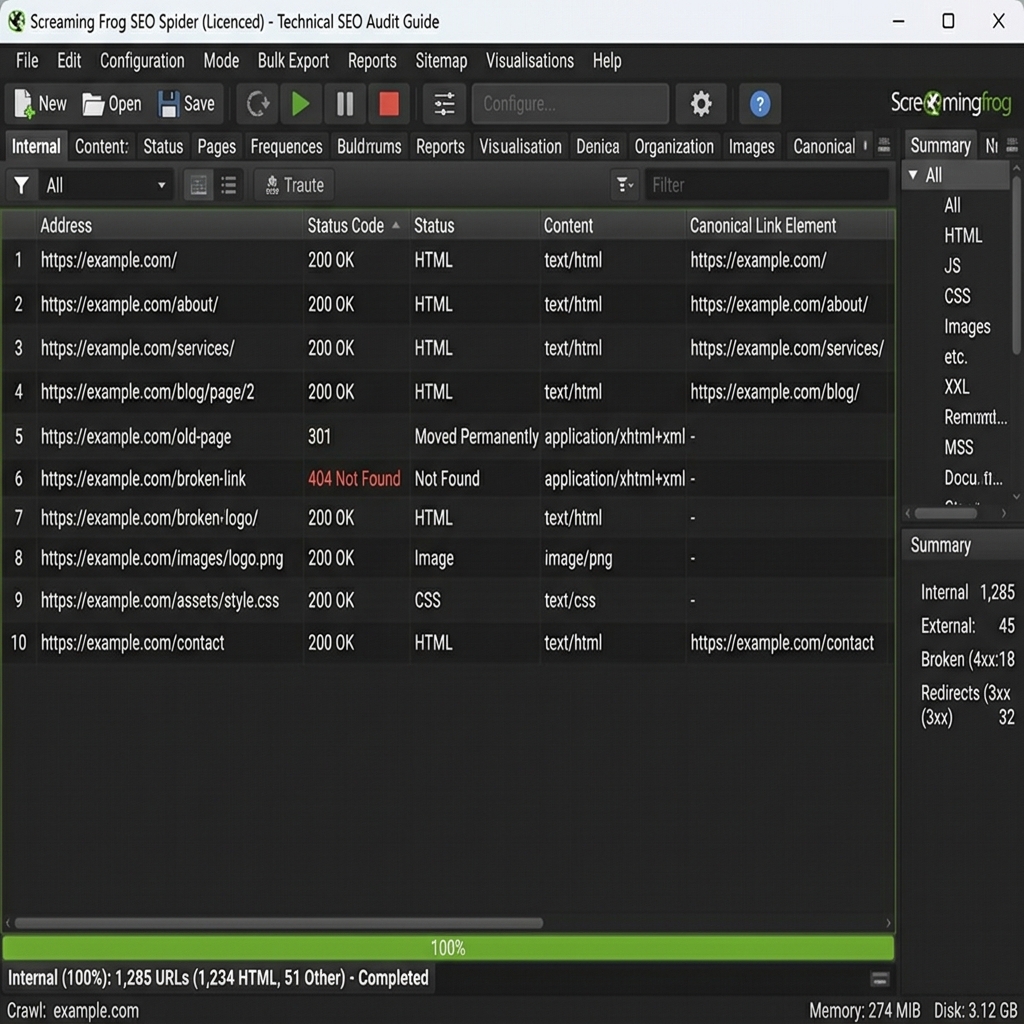
Screaming Frog Crawl InterfaceScreaming Frog crawl diagnostics identifying 404 status codes and canonical configurations.
- Expert Insight (The Staging Site Trap): Just last month, a SaaS client came to us wondering why their newly launched feature pages had zero organic impressions. Within two minutes, we spotted the issue: their developers had pushed the staging site live, complete with a
Disallow: /command in the robots.txt file. - What to check while the crawl runs:
- Robots.txt: Navigate to
yourdomain.com/robots.txt. Verify your directives against Google’s Robots.txt Specifications. - XML Sitemap: Check
yourdomain.com/sitemap.xml. Ensure your sitemap is clean, up-to-date, and registered in Google Search Console. It should only include status 200 URLs (no 404s, redirects, or non-canonical pages).
- Robots.txt: Navigate to
Phase 2: Indexation & Google Search Console Audit (Minutes 5–15)
Checking indexation status is a crucial part of any technical seo audit checklist. If Google cannot index your pages, they will never appear in search results.
- Action: Log into your Google Search Console account.
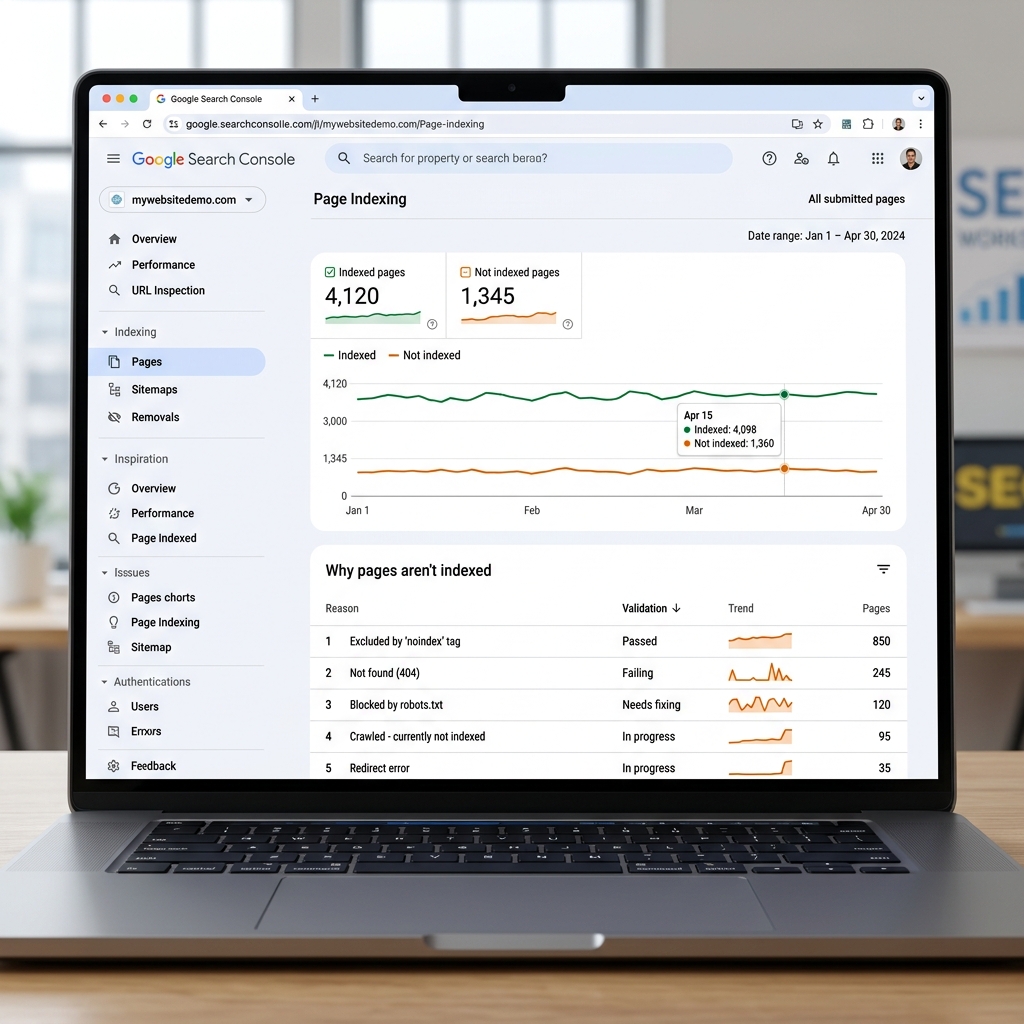
Reviewing the Google Search Console indexing status trends and error classes.
- What to check:
- Indexing Report: Look at the “Pages” tab. Are there any sudden spikes in “Not indexed” pages? Inspect common issues such as
Excluded by ‘noindex’ tagorAlternative page with proper canonical tag. - The “Noindex” vs. Canonicalization Edge Case: A common mistake we see on e-commerce sites is lazy canonicalization of parameterized filter pages (e.g.,
?color=blue&size=large). Instead of pointing to the master category page, developers often apply a blanketnoindexto all parameters. Rule of thumb: Only usenoindexon utility pages (cart, checkout, thank-you pages). For product filters, correct canonicalization preserves your link equity and avoids Google ignoring links on those pages entirely. - Manual Actions & Security: Check the “Security & Manual Actions” tab to ensure your site does not have any active penalties or security issues (malware hacks).
- Indexing Report: Look at the “Pages” tab. Are there any sudden spikes in “Not indexed” pages? Inspect common issues such as
Phase 3: Speed, Performance & Core Web Vitals (Minutes 15–20)
No modern technical seo audit checklist is complete without verifying site performance. Page speed is a direct Google ranking factor; a slow website frustrates users and reduces crawl efficiency.
- Action: Run your key pages (Homepage, Top Landing Pages, and Blog Templates) through Google PageSpeed Insights.
- What to check:
- Core Web Vitals: Focus on the three key metrics defined by web.dev Core Web Vitals guidelines:
- Largest Contentful Paint (LCP): Measures loading performance. Target: Under 2.5 seconds.
- Interaction to Next Paint (INP): Measures page responsiveness. Target: Under 200 milliseconds (Note: INP replaced FID in March 2024).
- Cumulative Layout Shift (CLS): Measures visual stability. Target: Under 0.1.
- Quick Wins: Serve next-gen image formats (WebP/AVIF), defer non-critical JavaScript, and utilize modern CSS layout methods to prevent layout shifts.
- Core Web Vitals: Focus on the three key metrics defined by web.dev Core Web Vitals guidelines:
Phase 4: Links, Redirects, and SSL Security (Minutes 20–25)
A healthy site architecture provides a smooth path for users and link equity (page authority) to flow.
- Action: Go back to your completed website crawl from Phase 1.
- What to check:
- Broken Links (404 Errors): Identify any internal links returning a 404 status code and replace or remove them.
- Redirect Chains: Ensure redirects go directly from Point A to Point B. Avoid chains (A → B → C) which waste crawl budget and slow down the user.
- SSL/HTTPS Protocol: Ensure every page loads securely over HTTPS. Mixed-content errors (loading HTTP assets on an HTTPS page) can trigger browser warning screens.
Phase 5: Structured Data & Usability (Minutes 25–30)
In the age of semantic search and AI overviews, helping search engines understand your context is critical.
- Action: Inspect your page code or run test URLs in Google’s Rich Results Test tool.
- What to check:
- Modern Schema Markup: Ensure your pages utilize structured data (like Organization, Article, Product, or LocalBusiness schema) to gain rich snippets in search results.
- ⚠️ The FAQ Schema Update: Avoid adding FAQ schema to your pages. As of May 2026, Google has completely dropped support for FAQ rich results for most sites. Stick to Product, Article, and Review markup, which continue to drive visibility.
- Mobile-Friendliness: Verify that font sizes, buttons, and layouts adjust seamlessly across mobile screens. Since Google operates on mobile-first indexing, the mobile version is what determines your rankings.
Technical Audit Triage: How to Prioritize Your Fixes
When you complete a crawl and find 150+ individual errors, it’s easy to feel overwhelmed. Here’s a quick prioritization matrix we use at The Search Surgeons to triage technical issues:
| Priority | Issue Type | Impact | Action Required |
|---|---|---|---|
| P0: Critical | Robots.txt blockages, 5xx server errors, sitewide noindex | Search visibility drops to zero | Fix immediately; check staging files and server logs. |
| P1: High | Redirect loops, broken internal links (404s) on main landing pages, failed Core Web Vitals (LCP > 4s) | User experience is severely damaged; link equity is wasted | Resolve redirect chains; optimize hero images and scripts. |
| P2: Medium | Missing canonical tags, duplicate content parameters | Search engines crawl duplicate pages, diluting rankings | Configure self-referencing canonicals or parameter rules. |
| P3: Low | Missing alt text on decorative images, minor HTML validation warnings | Negligible impact on rankings | Fix during routine site updates or content sweeps. |
Automated vs. Manual SEO Auditing
If you don’t have time to run a manual check or lack access to premium crawler software, you can use our automated seo-audit-tool which acts as a quick, automated technical seo audit checklist to analyze your site structure instantly.
Conclusion & Next Steps
A technical SEO audit isn’t a one-time chore; it’s a recurring hygiene practice. Bookmark this technical seo audit checklist and run through it at least once a quarter to capture crawl errors before they impact your organic traffic.
By fixing broken links, resolving indexation issues, and optimizing your Core Web Vitals, you build a bulletproof foundation that ensures your content gets the search visibility it deserves.
Want our team of search specialists to handle your optimization? Get in touch with The Search Surgeons today for a deep-dive custom audit.